

Now on iPhone, Android and the web

Say it.
It’s planned.

Brief Tasko the way you’d brief a teammate. It turns one sentence into tasks with owners, due dates and estimates, then watches workload and deadlines so you don’t have to.

  • Free for teams up to 15
  • English, Urdu and Arabic
  • No passwords, no setup project
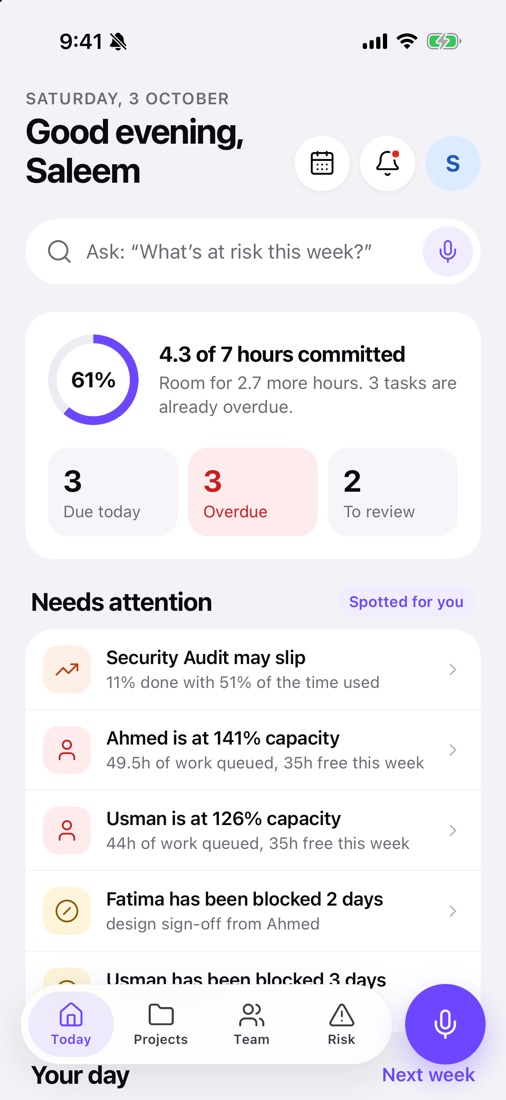
Tasko’s Today screen: 4.3 of 7 hours committed, 3 tasks due today, 1 overdue, and a Needs attention list flagging a slipping project and two overloaded teammates.

01How voice works

One sentence in. A whole plan out.

Tasko picks out who, what and when, splits “three posts” into three, and shows you the plan before anything is created. In English, Urdu or Arabic, even mixed.

Listening · English

Tasko plans · Eid campaign

  1. Write the campaign briefHira · 2 hoursWed 7 Oct
  2. Design 3 postsAisha · split into 3 subtasksNext week
  3. Review the copyZara · 1 hourFri 9 Oct

Missing something important? Tasko asks one short question instead of guessing. Prefer typing? Every task has a normal form too.

02For team leads

See the team, not the tool.

Tasko watches workload, deadlines and quiet projects in the background, and only speaks up when it matters.

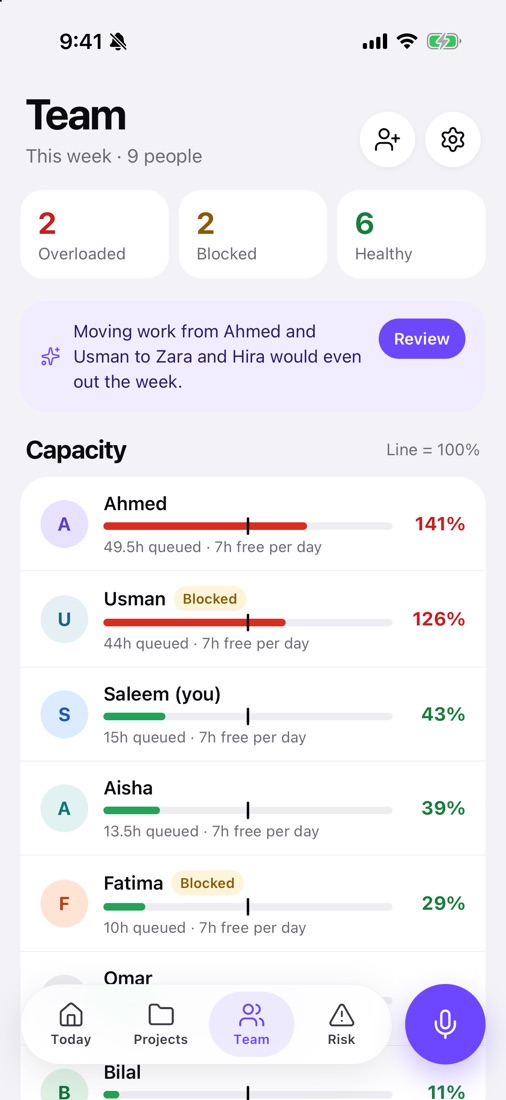
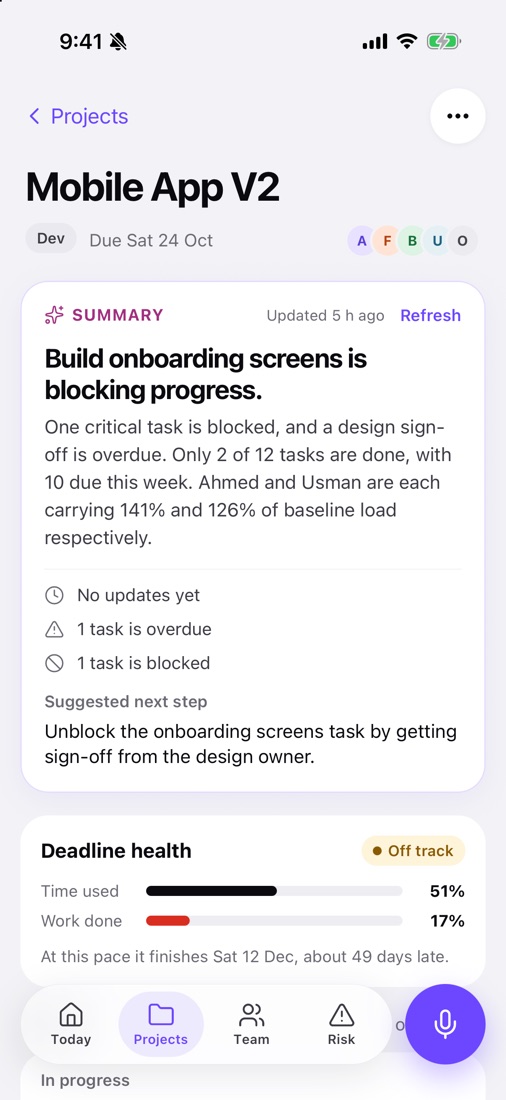
Team screen showing capacity bars for each person: Ahmed at 141% and Usman at 126% in red, Saleem at 40% and Aisha at 39% in green. Risk screen listing tasks that need a look, starting with overdue items, each with Open, Reassign and Extend buttons. Project page with a summary of how it is really going, a suggested next step, and a deadline health card.

Workload

Know who has room before you assign.

Everyone gets a real capacity number: hours of open work against the hours they actually have, after time off and a buffer. Push someone past 100% and Tasko tells you, and suggests a teammate with free hours.

  • Green under 100%, amber to 120%, red above
  • Respects work hours, workdays and time off
  • Suggestions to even out the week

Risk and deadlines

Hear about slipping work while there’s still time.

The Risk tab ranks what to act on today: overdue tasks, blocked work and people stretched too thin. Act from the card: open, reassign, extend, or say “got it”.

  • Overdue, blocked and due-soon flags
  • Finish dates projected from recent pace
  • Quiet projects flagged before they’re forgotten

Summaries

A straight answer on every project.

Open a project and read a short, specific summary of how it’s really going, with one concrete next step. Or ask “What’s at risk this week?” and get an answer from your team’s live data.

  • Updates as the work changes
  • On every project and every person’s page
  • Ask questions in plain words

03Everything a team needs

Nothing it doesn’t.

Capacity

Hours against real hours.

0%

4.3 of 7 hours committed today

  • AAhmed141%
  • UUsman126%
  • HHira104%
  • ZZara29%

Risk

What needs a look today.

  • OverdueReview PR #482 · Payment retries
  • BlockedSign off onboarding designs
  • Due soonWrite payments API contract
  • NeglectedSecurity Audit · quiet for 9 days

Open, reassign, extend or dismiss, straight from the card.

Deadline health

Time used vs. work done.

Time used51%
Work done11%

May slip Projected finish: Tue 27 Oct, 11 days late.

Subtasks

“Three posts” becomes three.

Spaced daily, every other day, or all by the due date.

Reviews

Approve or send it back.

S October ad campaign planManager approval · 1 of 2
Request changesApprove

Multi-step approvals, with the right person told at each step.

Ask anything

“What is Bilal working on this week?”

Plain questions, answered from your team’s live data. Not a chatbot, an answer.

Tasko

Two things, both on track. Bilal is finishing the webhook handler for API Integration (due Thursday, 60% done) and has the sandbox keys task Friday. He’s at 11% capacity, so he has room if you need a hand on the audit.

04Language and privacy

Speak your way. Keep it yours.

English, Urdu and Arabic

Even mixed in one sentence. Names stay the way you say them, and Urdu is written the way your team types it.

  • ENAisha designs three posts by Friday.
  • URAisha Jumma tak teen posts design kar de.
  • ARعائشة تصمم ثلاث منشورات قبل الجمعة.

You choose where Tasko thinks

Switch any time in Settings → Voice.

  • On this iPhoneApple Intelligence on iPhone 15 Pro and newer. What you say never leaves the phone.
  • Cloud, minimal by defaultOnly the context needed goes to the model. Never used to train it. Recordings are deleted as soon as the text comes back.
  • Delete any timeRemove your account and data from Settings, or from our website.

05Getting started

Running in minutes. No setup project.

  1. 1

    Create your team

    Sign in with a code sent to your email. No passwords to forget.

  2. 2

    Invite people

    Share a link or code. Everyone sets their hours, so capacity is real from day one.

  3. 3

    Just say it

    Tap the mic and brief Tasko like a teammate. Or type it, if that’s your thing.

06Pricing

Free for teams up to 15 people during early access.

Larger teams and advanced reports are coming later. No card needed, nothing to cancel.

Start free in your browser

07FAQ

Good questions.

Something else? Email us.

Who is Tasko for?

Small teams, roughly 5 to 25 people, like agencies, studios and product or marketing teams, who want to see who’s doing what without heavy process.

Do I have to talk to it?

No. Voice is the fast way, but every task can be typed in a normal form too, with the person, due date, estimate and priority.

Which languages does voice understand?

English, Urdu and Arabic, including mixed sentences. Names are kept the way you say them, and Urdu is written in English letters, the way your team types.

How much does it cost?

Free for teams up to 15 people during early access. Larger teams and advanced reports are coming later.

Can I use it on a computer?

Yes. Tasko runs in the browser at app.tasko.works, and your team stays in sync in real time across phone and web.

How do I delete my account?

In the app go to Settings → Account → Delete account, or follow the steps on our account deletion page.

Your next plan is one sentence away.

Start with your own team, or load the sample team and see Tasko working in seconds.

Open in your browser